Help and support from the Lance team
Accepting or Declining a Loan
All you need to know about your loan offer after review

Written by Temidayo Awosanmi
After your loan request has been reviewed, you will need to decide whether to accept or decline the offer. Knowing where to find your loan offer and how to take action ensures you do not miss the opportunity before it expires.
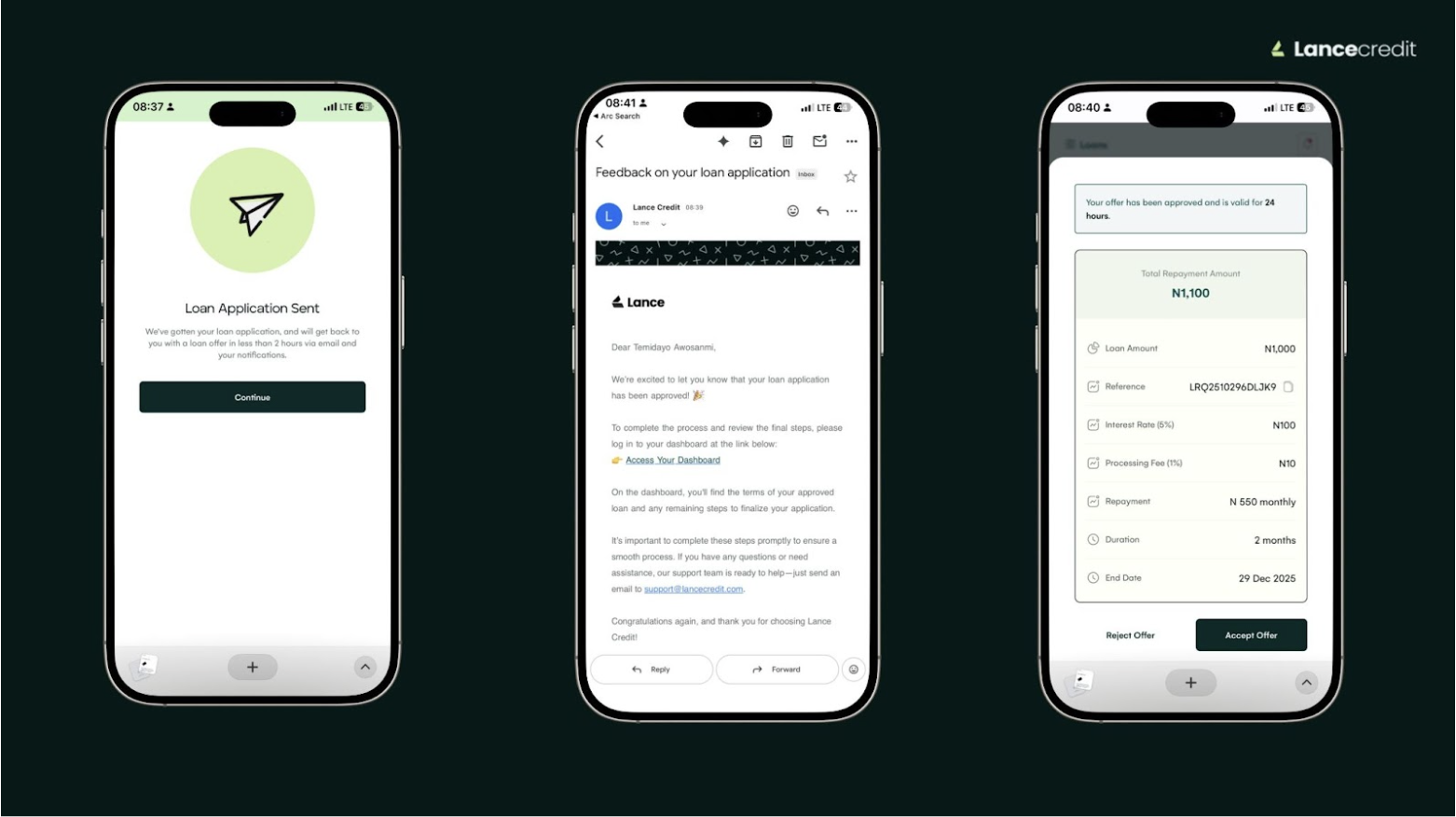
How to accept or decline a loan
- Loan reviews are usually completed within 24 hours. You will receive a notification via email once your loan has been reviewed.
- Log in to your account on the web at app.lancecredit.com.
- If you are on mobile, tap the sidebar menu and go to Loans. You will see three sections: Active, Pending, and Completed. Tap Pending to view your loan offer.
- If you are on desktop, go to Loan History in the right corner of your dashboard to find your pending loan offer.
- Select the loan and choose whether to Accept or Decline.
What’s next
- Loan offers expire after 24 hours if no action is taken.
- If you accept the loan, the approved amount will be disbursed to your Lance wallet within 2 hours.
Tip: Accept your loan offer as soon as you receive it to avoid missing the 24 hour window.
Related Articles